


The Roku App (Official)
4.7258.23K Reviews
App Specs
- Version
- 14.0.0.9462138
- Updated On
- License
- Free
- Downloads
- 100,000,000+
- Developer
- Roku, Inc. & its affiliates
- Categories
- Entertainment
- Platform
- Android, iOS
Screenshots
 Analysis by AppCompare
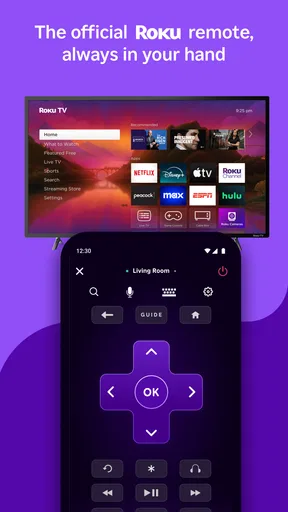
I rely on my phone for more than finding the remote when it slips between the cushions. With The Roku App (Official), I can use a mobile device to control a Roku player or TV, search for something to watch, and handle a few viewing tasks from the same place. It is a free entertainment app from Roku, Inc. and its affiliates, and I find it most useful when the phone and television are already part of the same connected routine.
When the connection is doing the work
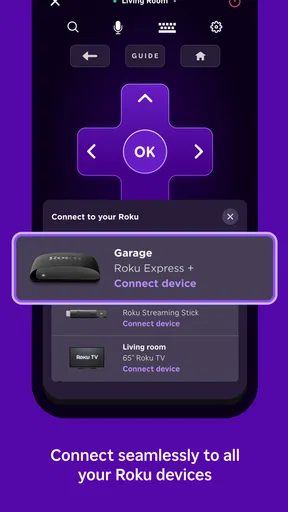
The remote-control function depends on a simple but important detail: the phone and Roku device need to be on the same Wi-Fi network. When that is true, tapping the screen can be quicker than searching for the physical remote, especially if I only need to pause, adjust playback, or move through menus. When the devices are not on the same network, I would not expect the phone to take over as a remote. That makes the app a companion to a Roku setup, not a general-purpose remote for any television.
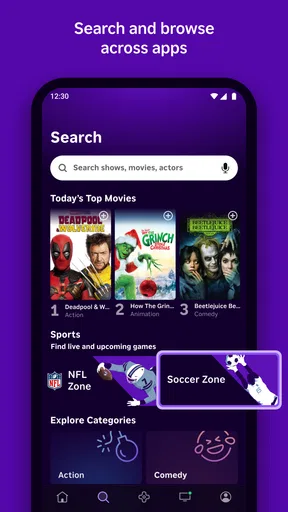
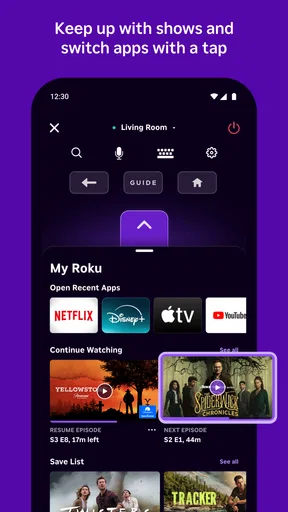
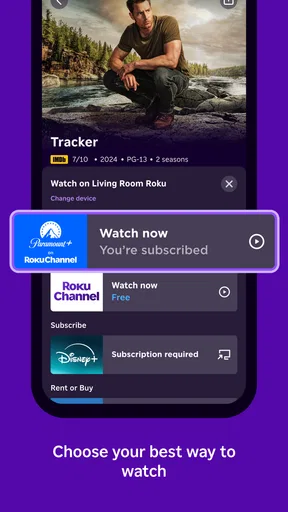
Network conditions shape more than control. Searching for a film or show is most helpful when the app can communicate with the Roku setup and return useful viewing options. I like being able to search from the phone rather than pecking out a title with a directional pad, but I still treat the result as a shortcut to browse, not a promise that every title will be available to watch. The app can help me locate something across channels; the channel or service still determines what I can play.
A phone-sized control room, with a few limits
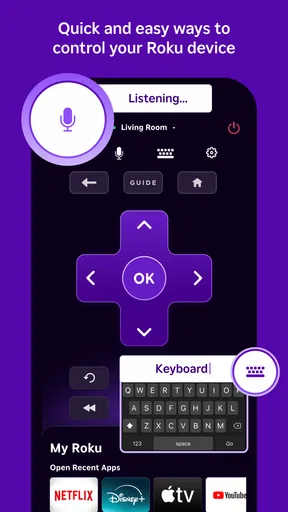
The controls make the most sense when my phone is within reach and the TV is already in use. I can keep the phone in hand while browsing, then switch back to the television for the actual viewing. Voice search is another way to avoid typing a title, though it is not automatically better in every room: a quiet space and a clear request make speaking more convenient, while a noisy living room can make ordinary text entry the less frustrating choice.
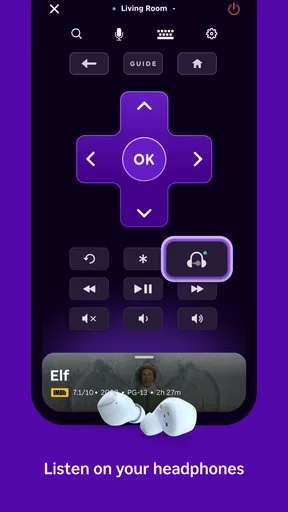
The app also includes private listening, which routes TV sound through headphones connected to the phone. I see that as a practical option for late viewing or for sharing a room with someone who wants quiet. It is a different solution from simply turning down the television: I can keep the program audible to myself without making the whole room listen. The trade-off is that this depends on keeping the phone close and using headphones, so it is not how I would listen while moving around the house.
Mobile moments that suit it
A realistic use for me is settling in after dinner, only to realize the remote is in another room—or perhaps under a blanket. If my phone is on the same Wi-Fi network as the Roku device, I can use the app instead of interrupting everyone to look for the remote. I might search for a title on the phone, choose what to watch, and then use private listening later if someone else goes to bed. Those are small conveniences, but they fit naturally into an ordinary evening.
Casting photos and videos from the phone to the TV is a separate kind of use. It can make a group moment easier: rather than passing a phone around, I can put vacation pictures on the larger screen. I would use it for material already on my device, not as a substitute for the app’s search or for a streaming service. A useful habit is to decide what I want to show before gathering everyone around; browsing through a long camera roll on the spot can be slower than the actual casting.
Worth Reading Before You Choose

EA SPORTS FC Mobile 26 Is a Bigger Football Game, but It Takes Time

Flipboard Shows What News Apps Must Do Beyond the Feed

Switching to Android Auto Means Rethinking Your Driving Routine

Google Calendar Makes a Crowded Week Easier to Manage

Ludo King Makes the Most of the Minutes Between Plans

Baby Panda World Brings Quick Play to Modern Phones, but Its Game Library Feels Busy
Because this app is tied to Roku, it is a particularly sensible choice for someone who already uses a Roku player or TV and wants the phone to fill in as a companion. Someone who mainly watches on another platform, or wants one remote app to control a mix of unrelated devices, should look at the controls built into that setup instead. The Roku app’s value is its relationship with Roku, not broad compatibility with every screen in the home.
Everyday control, search, and sharing
You know those moments when you just can't locate the remote? Well, with The Roku App (Official), your smartphone turns into a fully functional remote control. The setup is a breeze; just make sure your phone and Roku device are on the same Wi-Fi network. Swipe, tap, and voila—you’re controlling your TV from your phone like a tech wizard.
Streamlined Streaming
Beyond being a remote, this app lets you stream thousands of channels right to your phone. Whether you’re into binge-watching the latest series or catching up on news, the app has you covered. It’s like having a mini TV in your pocket, and I’m not mad about it!
Plus, the search feature is super handy. Type in the name of a show or movie, and the app hunts it down across all your channels. It’s like having a personal assistant for your viewing pleasure.
Private Listening, Public Convenience
Here’s a feature I absolutely love—private listening. Ever wanted to watch something without disturbing everyone else in the house? Just plug your headphones into your phone, and the sound comes through there instead of the TV. It’s perfect for late-night binge sessions or when you want to keep things quiet.
Photo and Video Casting
Want to show off your vacation photos on the big screen? The app lets you cast photos and videos directly from your phone to the TV. It’s simple and saves you the hassle of trying to connect other devices. I’ve used it a bunch, and it’s always a hit at gatherings.
The app also supports voice search, which is a game-changer. Just speak the name of the show or movie you want to watch, and the app does the rest. It’s like having a magic wand for your TV.
Connection snags and sensible workarounds
If the phone cannot find the Roku device, I would first check that both are using the same Wi-Fi network rather than immediately reinstalling anything. A household may have more than one network name, and a phone that has switched networks can quietly break the connection. Returning both devices to the same network is the most useful first check. If the physical remote is available, it also gives me a way to keep watching while I sort out the phone connection.
There is a practical distinction between a connection problem and a content problem. If the remote controls the TV but a particular title does not play, repeatedly reconnecting the phone may not help; the issue could be with the channel or service being used. I find it more efficient to test a basic control first, then consider the viewing service separately. That simple split prevents the app from becoming the suspect every time something in the streaming chain misbehaves.
Using it without adding phone friction
The phone is convenient, but it can also become another screen to manage. If I am settling in for a long film, I prefer to use the app for setup and searching, then put the phone aside. For a short clip, a quick pause, or showing pictures to visitors, leaving it nearby makes more sense. This is a small workflow choice, but it keeps a helpful remote from turning into an invitation to check unrelated notifications throughout a show.
For data-conscious use, the key is to distinguish controlling the TV from watching video on the phone or casting media. Remote taps and text searches are not the same activity as streaming a program to a mobile screen. If I am trying to conserve mobile data, I keep the phone connected to Wi-Fi and avoid assuming that a viewing feature will use no data simply because the app is called a remote. The same care applies when sharing personal photos: choose the images intentionally before casting, especially when other people are watching the screen.
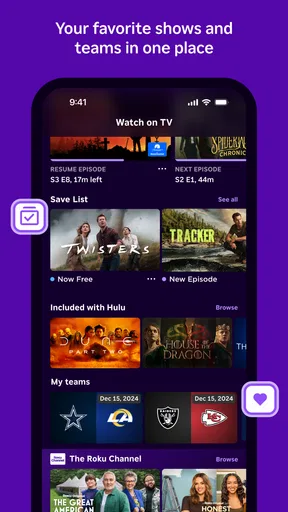
Compared with a physical remote, the app is better for typing, voice search, and keeping control close at hand; a physical remote is often more dependable when the phone battery is low or the network is unavailable. Compared with opening each streaming service separately, the app’s search can save time when I am deciding what to watch across channels. But it does not erase the differences between those services or replace their own viewing experiences. I use it as a Roku-focused shortcut rather than expecting it to unify every part of streaming.
Who will get the most from it
I would recommend it most to people who regularly use a Roku device and already keep a phone nearby. It is especially handy in households where the remote goes missing, where one person wants to search without interrupting the current screen, or where quiet listening and occasional photo sharing are useful. The app is free, and its 4.7 average from around four million ratings suggests that many users find this sort of companion useful. It has been available since March 2, 2012, and has passed 50 million installs.
It is less compelling if I rarely use Roku, need a remote that works with different brands, or do not want to depend on a shared Wi-Fi connection for phone control. In those cases, the manufacturer’s physical remote or the controls built into the device I use may be simpler. The app is rated Teen, and its current version is 13.4.0.7242945 for devices running OS 9 or later. Those details make it worth checking compatibility before installing, particularly on an older phone.
My connectivity verdict
All in all, The Roku App (Official) is a fantastic addition to any Roku user's toolkit. It’s convenient, user-friendly, and packed with features that make streaming easier than ever. If you haven’t tried it yet, give it a go—you might just find it hard to go back to the old way of doing things!
So, if you're ready to enhance your streaming experience, download the app and give it a whirl. Trust me, your TV time will never be the same!
Pros
- User-friendly interface for easy navigation.
- Seamless streaming across Roku devices.
- Voice search feature enhances usability.
- Customizable remote for personalized control.
- Free to use
- no hidden costs.
Cons
- Requires Roku device for full functionality.
- Limited to Roku-supported channels only.
- Occasional connectivity issues reported.
- Ads may interrupt browsing experience.
- No offline viewing option available.
FAQs for The Roku App (Official)
What features does The Roku App (Official) offer?
The Roku App (Official) provides a comprehensive remote control for your Roku device, allowing you to navigate channels and control playback easily. It also offers voice search capabilities, private listening through headphones, and the ability to stream media from your mobile device to your TV. Additionally, it features a handy keyboard for quick text input.
Is The Roku App (Official) free to download and use?
Yes, The Roku App (Official) is completely free to download and use. However, while the app itself is free, some content or channels available through Roku may require a subscription or purchase. The app enhances your Roku experience by adding convenience and additional functionalities without any extra cost.
Can I use The Roku App (Official) without a Roku device?
No, The Roku App (Official) is designed to work exclusively with Roku streaming devices and Roku TVs. Without a Roku device, the app cannot function as intended. It serves as a companion app, enhancing the user experience by offering remote control features and additional functionalities.
Does The Roku App (Official) support voice commands?
Yes, The Roku App (Official) supports voice commands, allowing users to search for content, launch channels, and control playback using their voice. This feature is designed to make navigation easier and more efficient, particularly for users who prefer hands-free control over their Roku device.
How does private listening work on The Roku App (Official)?
Private listening on The Roku App (Official) allows you to listen to your TV audio through headphones connected to your mobile device. This feature is ideal for enjoying your shows without disturbing others. Simply plug in your headphones or connect them via Bluetooth to your phone, and the app streams the audio directly to your ears.


